
初识 Nodejs
Node.js®
Node.js® is a JavaScript runtime built on Chrome's V8 JavaScript engine
Node.js® 是一个基于 Chrome V8 引擎 的 JavaScript 运行时环境
注意
不能操纵DOM、BOM的API,可以使用console和定时器API
顶级对象为global,可使用globalThis访问顶级对象
Buffer缓冲器
1. 概念
类似于数组,用于固定长度的字节序列
本质是一段内存空间,专门用来处理二进制数据
2.特点
buffer大小固定,无法调整
buffer性能较好,可直接对计算机内存进行操作
每个元素大小为1字节
3. 使用
3.1 创建Buffer
// alloc(分配)
let buf = Buffer.alloc(10)
console.log(buf);

// allcoUnsafe(复用空间,数据,速度快)
let buf2 = Buffer.allocUnsafe(10)
console.log(buf2);

// from
let buf3 = Buffer.from('hello world')
let buf4 = Buffer.from([105, 108, 111, 118, 101, 121, 111, 117])
console.log(buf4);3.2 Buffer与字符串的转化,读写
// Buffer与字符串的转化
let buf4 = Buffer.from([105, 108, 111, 118, 101, 121, 111, 117])
console.log(buf4.toString());

// []
let buf1 = Buffer.from('heeee')
console.log(buf1[0].toString(2)); //查看
console.log(buf1);
buf1[0] = 95  // 修改
console.log(buf1);

// 溢出
let buf2 = Buffer.from('hello')
buf2[0] = 361; //舍弃高位的数字
// 中文
let buf3 = Buffer.from('你好')
console.log(buf3); //<Buffer e4 bd a0 e5 a5 bd> 六个字节,一个utf-8的中文占三个字节fs模块
fs 模块可以实现与硬盘的交互
例如文件的创建、删除、重命名、移动还有文件内容的写入、读取以及文件夹的相关操作
1. 文件写入
| 方法 | 说明 |
|---|---|
| writeFile | 异步写入 |
| writeFileSync | 同步写入 |
| appendFile / appendFileSync | 追加写入 |
| createWriteStream | 流式写入 |
1.1 writeFile异步写入
语法: fs.writeFile(file, data[, options], callback**)**
/*
  需求:
  新建一个文件,座右铭.txt,写入内容,三人行,则必有我师焉
*/

// 1. 导入fs模块
const fs = require('fs')

// 2. 写入内容
fs.writeFile('./座右铭.txt', '三人行,则必有我师焉', err=>{
  // 错误回调,值为错误对象或null
  if(err){
    console.log('写入失败');
    return;
  }else{
    console.log('写入成功');
  }
})1.2 writeFileSync同步写入
语法: fs.writeFileSync(file, data[, options])
// 1. 导入fs模块
const fs = require('fs')

// 2.同步写入
fs.writeFileSync('./data.txt', 'test')Node.js 中的磁盘操作是由其他 线程 完成的,结果的处理有两种模式:
同步处理 JavaScript 主线程 会等待 其他线程的执行结果,然后再继续执行主线程的代码,效率较低
异步处理 JavaScript 主线程 不会等待 其他线程的执行结果,直接执行后续的主线程代码,效率较好
1.3 appendFile / appendFileSync 追加写入
语法:
fs.appendFile(file, data[, options], callback**)**
fs.appendFileSync(file, data[, options])
// appendFile / appendFileSync 追加写入

const fs = require('fs')
// fs.appendFile('./座右铭.txt', ',追加内容', err=>{
//   if(err){
//     console.log('失败');
//     return
//   }else{
//     console.log('成功');
//   }
// })

// fs.appendFileSync('./座右铭.txt', '\r\n换行追加')

// writeFile实现追加
fs.writeFile('./座右铭.txt', '\r\nwirteFile追加', {flag : 'a'} ,err=>{
    if(err){
      console.log('失败');
      return
    }else{
      console.log('成功');
    }
})1.4 createWriteStream 流式写入
语法: fs.createWriteStream(path[, options])
const fs = require('fs');

// 创建写入流对象
const ws = fs.createWriteStream('./流式写入.txt')

ws.write('写入1\r\n')
ws.write('写入2\r\n')
ws.write('写入3\r\n')
ws.write('写入4\r\n')

// 关闭
ws.close流式写入方式适用于 大文件写入或者频繁写入 的场景, writeFile 适合于 写入频率较低的场景
1.5 写入文件的场景
下载文件
安装软件
保存程序日志,如 Git
编辑器保存文件
视频录制
当 需要持久化保存数据 的时候,应该想到 文件写入
2. 文件读取
| 方法 | 说明 |
|---|---|
| readFile | 异步读取 |
| readFileSync | 同步读取 |
| createReadStream | 流式读取 |
2.1 readFile / readFileSync 异步 / 同步读取
语法:
fs.readFile(path[, options], callback**)**
fs.readFileSync(path[, options])
const fs = require('fs');

// 异步读取
fs.readFile('./流式写入.txt', (err, data)=>{
  // err错误信息,data读取内容
  if(err){
    console.log('失败');
    return
  }
  console.log(data.toString());
})

// 同步读取
let data = fs.readFileSync('./流式写入.txt')
console.log(data.toString());2.2 流式读取
语法: fs.createReadStream(path[, options])
const fs = require('fs');

// 创建读取流对象
const rs = fs.createReadStream('./流式写入.txt')

// 绑定data事件 每次读取一块就调用一次回调函数。 每次最多读取64kb的数据
rs.on('data', chunk => {
  console.log(chunk);
})2.3 读取文件的场景
电脑开机
程序运行
编辑器打开文
查看图片
播放视频
播放音乐
Git 查看日志
上传文件
查看聊天记录
3. 移动和重命名
语法:
fs.rename(oldPath, newPath, callback**)**
fs.renameSync(oldPath, newPath)
const fs = require('fs');

// 调用rename  本质:更改文件路径
// 重命名
fs.rename('./座右铭.txt', './座右铭重命名.txt', err =>{
  if(err){
    console.log('Error ren');
    return;
  }
  console.log('成功');
})

// 移动
fs.rename('./data.txt', '../资料/data.txt', err =>{
  if(err){
    console.log('Error ren');
    return;
  }
  console.log('成功');
})4. 文件删除
语法:
fs.unlink(path, callback**)**
fs.unlinkSync(path)
 const fs = require('fs');

// unlink  unlinkSync
// fs.unlink('./流式写入.txt', err=>{
//   if(err){
//     console.log('删除失败');
//     return
//   }
//   console.log('成功');
// })

// rm  rmSync
fs.rm('./座右铭重命名.txt', err => {
  if (err) {
    console.log('删除失败');
    return
  }
  console.log('成功');
})5. 文件夹操作
| 方法 | 说明 |
|---|---|
| mkdir/mkdirSync | 创建 |
| readdir/readdirSync | 读取 |
| rmdir/rmdirSync | 删除 |
5.1 mkdir创建
语法:
fs.mkdir(path[, options], callback**)**
fs.mkdirSync(path[, options])
const fs = require('fs');

// 创建 mkdir
// fs.mkdir('./html', err => {
//   if (err) {
//     console.log('删除失败');
//     return
//   }
//   console.log('成功');
// })

// 递归创建
// fs.mkdir('./a/b/c', {recursive: true}, err => {
//   if (err) {
//     console.log('删除失败');
//     return
//   }
//   console.log('成功');
// })5.2 readdir读取
语法:
fs.readdir(path[, options], callback**)**
fs.readdirSync(path[, options])
const fs = require('fs');

fs.readdir('../资料', (err, data) => {
  if (err) {
    console.log('删除失败');
    return
  }
  console.log(data);
})5.3 rmdir删除
语法:
fs.rmdir(path[, options], callback**)**
fs.rmdirSync(path[, options])
// 删除文件夹  文件夹不为空会失败
// fs.rmdir('./html', err => {
//   if (err) {
//     console.log('删除失败');
//     return
//   }
//   console.log('成功');
// })

// 递归删除
// 删除文件夹
fs.rm('./a',{recursive: true}, err => {
  if (err) {
    console.log('删除失败');
    return
  }
  console.log('成功');
})6. 查看资源状态
语法:
fs.stat(path[, options], callback**)**
fs.statSync(path[, options])
const fs = require('fs');

// stat
fs.stat('./座右铭-写入流复制.txt', (err, data) => {
  if (err) {
    console.log('删除失败');
    return
  }
  // console.log(data);
  // ifFile
  console.log(data.isFile());
  // isDirectory
  console.log(data.isDirectory());
})7. 路径问题
相对路径
- ./座右铭.txt 当前目录下的座右铭.txt
- 座右铭.txt 等效于上面的写法
- ../座右铭.txt 当前目录的上一级目录中的座右铭.txt
绝对路径
- D:/Program Files windows 系统下的绝对路径
- /usr/bin Linux 系统下的绝对路径
相对路径中所谓的 当前目录 ,指的是 命令行的工作目录 ,而并非是文件的所在目录
所以当命令行的工作目录与文件所在目录不一致时,会出现一些 BUG
8. __dirname
__dirname 与 require 类似,都是 Node.js 环境中的'全局'变量
**__**dirname 保存着 当前文件所在目录的绝对路径 ,可以使用 __dirname 与文件名拼接成绝对路径
let data = fs.readFileSync(__dirname + '/data.txt');使用 fs 模块的时候,尽量使用 __dirname 将路径转化为绝对路径,这样可以避免相对路径产生的 Bug
Path
| API | 说明 |
|---|---|
| path.resolve | 拼接规范的绝对路径 |
| path.sep | 获取操作系统的路径分隔符 |
| path.parse | 解析路径并返回对象 |
| path.basename | 获取路径的基础名称 |
| path.dirname | 获取路径的目录名 |
| path.extname | 获取路径的扩展名 |
const path = require('path');

console.log('__dirname', __dirname);  // F:\test\node\nodeLearn\03-path
path.resolve(__dirname, './index.html')

console.log(path.resolve(__dirname, './index.html')); // F:\test\node\nodeLearn\03-path\index.html
console.log(path.resolve(__dirname, 'index.html')); // F:\test\node\nodeLearn\03-path\index.html

console.log(path.sep); //   \

console.log(__filename); //F:\test\node\path\path.js

/* {
  root: 'F:\\',
  dir: 'F:\\test\\node\\path',
  base: 'path.js',
  ext: '.js',
  name: 'path'
} */
console.log(path.parse(__filename));

console.log(path.basename(__filename)); //path.js

console.log(path.dirname(__filename)); //F:\test\node\path

console.log(path.extname(__filename)); //.jsHTTP
1. 创建HTTP服务
// 1.导入http模块
const http = require('http');

// 2.创建服务对象
// request 意为请求. 是对请求报文的封装对象, 通过 request 对象可以获得请求报文的数据
// response 意为响应. 是对响应报文的封装对象, 通过 response 对象可以设置响应报文
const server = http.createServer((request, response) =>{
  // 中文乱码解决
  response.setHeader('content-type', 'text/html;charset = utf-8')
  response.end('hello http server')
})

// 3.监听端口,启动服务
server.listen(9000, () => {
  // 服务启动成功后执行
  console.log('服务启动成功');
})2. 获取http请求报文
| 语法 | 说明 |
|---|---|
| request.method | 请求方法 |
| request.httpVersion | 请求版本 |
| request.url | 请求路径 |
| request.('url').parse(request.url).pathname | url路径 |
| request..('url').parse(request.url, true).query | url查询字符串 |
| request.headers | 请求头 |
| request.on('data',function(chunk){})request.on('end',function(){}) | 请求体 |
// 1.导入http模块
const http = require('http');

// 2.创建服务对象
// request 意为请求. 是对请求报文的封装对象, 通过 request 对象可以获得请求报文的数据
// response 意为响应. 是对响应报文的封装对象, 通过 response 对象可以设置响应报文
const server = http.createServer((request, response) =>{
  // 中文乱码解决
  response.setHeader('content-type', 'text/html;charset = utf-8')
  // http://127.0.0.1:9000/account?a=1111&keyword=11231231
  // 请求方法
  console.log('请求方法',request.method); //GET
  console.log('请求版本',request.httpVersion); //1.1
  // 请求路径
  console.log('请求路径',request.url); //account?a=1111&keyword=11231231
  console.log('请求头',request.headers); //Object
  response.end('hello http server')
})

// 3.监听端口,启动服务
server.listen(9000, () => {
  // 服务启动成功后执行
  console.log('服务启动成功');
})3. 提取请求报文body
// 1.导入http模块
const http = require('http');

// 2.创建服务对象
// request 意为请求. 是对请求报文的封装对象, 通过 request 对象可以获得请求报文的数据
// response 意为响应. 是对响应报文的封装对象, 通过 response 对象可以设置响应报文
const server = http.createServer((request, response) => {
  let body = ''
  request.on('data', chunk => {
    body += chunk;
  })

  request.on('end', () => {
    console.log(body);  // post方法提交的参数 username=12321&password=3123
    response.end('hello http')
  })
  // 中文乱码解决
  response.setHeader('content-type', 'text/html;charset = utf-8')

})

// 3.监听端口,启动服务
server.listen(9000, () => {
  // 服务启动成功后执行
  console.log('服务启动成功');
})4. 提取http请求报文中url路径及信息
//导入 http 模块
const http = require('http');
//1. 导入 url 模块
const url = require('url');

//创建服务对象
const server = http.createServer((request, response) => {
  // http://127.0.0.1:9000/abc/def?keyword=123
  //2. 解析 request.url
  console.log('res.url',request.url); // /abc/def?keyword=123
  // true使得query数据变为一个对象
  let res = url.parse(request.url, true);
  //路径
  console.log('res.pathname',res.pathname); ///abc/def
  // let pathname = res.pathname;
  //查询字符串
  console.log('res.query.keyword',res.query.keyword);  //123
  // let keyword = res.query.keyword;
  response.end('url');
});

//监听端口, 启动服务
server.listen(9000, () => {
  console.log('服务已经启动....')
});
//导入 http 模块
const http = require('http');

//创建服务对象
const server = http.createServer((request, response) => {
  //实例化 URL 的对象
  // let url = new URL('/search?a=100&b=200', 'http://127.0.0.1:9000');
  let url = new URL(request.url, 'http://127.0.0.1');
  // http://127.0.0.1:9000/account?a=1111&keyword=11231231
  console.log('request.url', request.url); // /account?a=1111&keyword=11231231
  //输出路径
  console.log('pathname',url); // Object
  //输出 keyword 查询字符串
  console.log(url.searchParams.get('keyword')); //11231231
  response.end('url new');
});

//监听端口, 启动服务
server.listen(9000, () => {
  console.log('服务已经启动....')
});4.1 练习
| 请求类型 | 请求地址 | 响应体结果 |
|---|---|---|
| get | /login | 登录 |
| get | /reg | 注册 |
// 1.http
const http = require('http');

// 2.创建服务对象
const server = http.createServer((resquest, response)=>{
  // http://127.0.0.1:9000/abc/def?keyword=123
  // 获取请求方法
  let {method} = resquest
  // 获取请求的url路径
  let {pathname} = new URL(resquest.url, 'http://127.0.0.1')
  console.log(method); // GET
  console.log(pathname);  //  /abc/def
  response.setHeader('content-type', 'text/html;charset=utf-8')
  if(method === 'GET' && pathname === '/login'){
    response.end('登录')
  }else if(method === 'GET' && pathname === '/reg'){
    response.end('注册')
  }else{
    response.end('404')
  }
})

server.listen(9000, ()=>{
  console.log('9000启动成功');
})5. 设置http响应报文
//导入 http 模块
const http = require('http');

//创建服务对象
const server = http.createServer((request, response) => {
  //1. 设置响应状态码
  // response.statusCode = 200
  //2. 响应状态的描述
  // response.statusMessage = 'message'
  //3. 响应头
  // response.setHeader('content-type', 'text/html;charset=utf-8')
  // response.setHeader('text', ['a','b'])
  //4. 响应体的设置
  response.write('11')
  response.write('11')
  response.write('11')
  response.end()
});

//监听端口, 启动服务
server.listen(9000, () => {
  console.log('服务已经启动....')
});6. 响应练习
搭建 HTTP 服务,响应一个4行3列的表格,并且要求表格有 隔行换色效果 ,且点击 单元格能 高亮显示
//导入 http 模块
const http = require('http');

//创建服务对象
const server = http.createServer((request, response) => {
  response.end(`
    <!DOCTYPE html>
    <html lang="en">
      <head>
        <meta charset="UTF-8">
        <meta http-equiv="X-UA-Compatible" content="IE=edge">
        <meta name="viewport" content="width=device-width, initial-scale=1.0">
        <title>Document</title>
        <style>
          td {
            padding: 20px 40px;
          }

          table tr:nth-child(odd) {
            background: rgb(179, 165, 201);
          }

          table tr:nth-child(even) {
            background: #fcb;
          }

          table,
          td {
            border-collapse: collapse;
          }
        </style>
      </head>
      <body>
        <table border="1">
          <tr>
            <td></td>
            <td></td>
            <td></td>
          </tr>
          <tr>
            <td></td>
            <td></td>
            <td></td>
          </tr>
          <tr>
            <td></td>
            <td></td>
            <td></td>
          </tr>
          <tr>
            <td></td>
            <td></td>
            <td></td>
          </tr>
        </table>
        <script>
          //获取所有的 td
          let tds = document.querySelectorAll('td');
          //遍历
          tds.forEach(item => {
            item.onclick = function () {
              this.style.background = '#222';
            }
          })
        </script>
      </body>
    </html>`)

});

//监听端口, 启动服务
server.listen(9000, () => {
  console.log('服务已经启动....')
});
//导入 http 模块
const http = require('http');
const fs = require('fs');

//创建服务对象
const server = http.createServer((request, response) => {
  //读取文件内容
  let html = fs.readFileSync(__dirname + '/10-table.html');
  console.log(__dirname);
  response.end(html); //设置响应体
});

//监听端口, 启动服务
server.listen(9000, () => {
  console.log('服务已经启动....')
});7. 响应扩展
//导入 http 模块
const http = require('http');
const fs = require('fs');

//创建服务对象
const server = http.createServer((request, response) => {
  //获取请求url的路径
  let {pathname} = new URL(request.url, 'http://127.0.0.1');
  console.log('pathname: ' , pathname);
  if(pathname === '/'){
    //读取文件内容
    let html = fs.readFileSync(__dirname + '/10_table.html');
    response.end(html); //设置响应体
  }else if(pathname === '/index.css'){
    //读取文件内容
    let css = fs.readFileSync(__dirname + '/index.css');
    response.end(css); //设置响应体
  }else if(pathname === '/index.js'){
    //读取文件内容
    let js = fs.readFileSync(__dirname + '/index.js');
    response.end(js); //设置响应体
  }else{
    response.statusCode = 404;
    response.end('<h1>404 Not Found</h1>')
  }

});

//监听端口, 启动服务
server.listen(9000, () => {
  console.log('服务已经启动....')
});8. 搭建静态资源
//导入 http 模块
const http = require('http');
const fs = require('fs');

//创建服务对象
const server = http.createServer((request, response) => {
  //获取请求url的路径
  let {pathname} = new URL(request.url, 'http://127.0.0.1');
  console.log('pathname: ' , pathname);
  let filePath = __dirname + '/page' + pathname;
  fs.readFile(filePath, (err, data) => {
      if(err){
          response.end('读取失败')
          return
      }
      response.end(data)
  })
});

//监听端口, 启动服务
server.listen(9000, () => {
  console.log('服务已经启动....')
});9. 静态资源目录
9.1 url
<!DOCTYPE html>
<html lang="en">
<head>
  <meta charset="UTF-8">
  <meta http-equiv="X-UA-Compatible" content="IE=edge">
  <meta name="viewport" content="width=device-width, initial-scale=1.0">
  <title>URL</title>
</head>
<body>
  <!-- 绝对路径 -->
  <a href="https://www.baidu.com">百度</a>
  <a href="//jd.com">京东</a>
  <a href="/search">搜索</a>
  <hr>
  <!-- 相对路径 -->
  <a href="./css/app.css">访问CSS</a>
  <a href="js/app.js">访问JS</a>
  <a href="../img/logo.png">访问图片</a>
  <a href="../../img/logo.png">访问图片</a>
</body>
</html>9.2 mime类型
mime 类型结构: [type]/[subType]
**例如: text/**html **text/**css **image/jpeg image/png application/**json
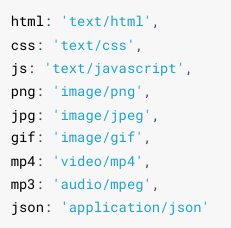
HTTP 服务可以设置响应头 Content-Type 来表明响应体的 MIME 类型,浏览器会根据该类型决定如何处理资源
下面是常见文件对应的 mime 类型
/**
 * 创建一个 HTTP 服务,端口为 9000,满足如下需求
 * GET  /index.html        响应  page/index.html 的文件内容
 * GET  /css/app.css       响应  page/css/app.css 的文件内容
 * GET  /images/logo.png   响应  page/images/logo.png 的文件内容
 */
//导入 http 模块
const http = require('http');
const fs = require('fs');
const path = require('path');
//声明一个变量
let mimes = {
  html: 'text/html',
  css: 'text/css',
  js: 'text/javascript',
  png: 'image/png',
  jpg: 'image/jpeg',
  gif: 'image/gif',
  mp4: 'video/mp4',
  mp3: 'audio/mpeg',
  json: 'application/json'
}

//创建服务对象
const server = http.createServer((request, response) => {
  if(request.method !== 'GET'){
    response.statusCode = 405;
    response.end('<h1>405 Method Not Allowed</h1>');
    return;
  }
  //获取请求url的路径
  let {pathname} = new URL(request.url, 'http://127.0.0.1');
  //声明一个变量
  let root = __dirname + '/page';
  // let root = __dirname + '/../';
  //拼接文件路径
  let filePath = root + pathname;
  //读取文件 fs 异步 API
  fs.readFile(filePath, (err, data) => {
    if(err){
      console.log(err);
      //设置字符集
      response.setHeader('content-type','text/html;charset=utf-8');
      //判断错误的代号
      switch(err.code){
        case 'ENOENT':
          response.statusCode = 404;
          response.end('<h1>404 Not Found</h1>');
        case 'EPERM':
          response.statusCode = 403;
          response.end('<h1>403 Forbidden</h1>');
        default:
          response.statusCode = 500;
          response.end('<h1>Internal Server Error</h1>');
      }

      return;
    }
    //获取文件的后缀名
    let ext = path.extname(filePath).slice(1);
    //获取对应的类型
    let type = mimes[ext];
    if(type){
      //匹配到了                          text/html;charset=utf-8
      if(ext === 'html'){
        response.setHeader('content-type', type + ';charset=utf-8');
      }else{
        response.setHeader('content-type', type);
      }
    }else{
      //没有匹配到
      response.setHeader('content-type', 'application/octet-stream');
    }
    //响应文件内容
    response.end(data);
  })

});

//监听端口, 启动服务
server.listen(9000, () => {
  console.log('服务已经启动....')
});10. GET和POST请求
10.1 场景
GET 请求的情况
- 在地址栏直接输入 url 访问
- 点击 a 链接
- link 标签引入 css
- script 标签引入 js
- img 标签引入图片
- form 标签中的 method 为 get (不区分大小写)
- ajax 中的 get 请求
POST 请求的情况:
- form 标签中的 method 为 post(不区分大小写)
- AJAX 的 post 请求
10.2 区别
GET 和 POST 是 HTTP 协议请求的两种方式。
- GET 主要用来获取数据,POST 主要用来提交数据
- GET 带参数请求是将参数缀到 URL 之后,在地址栏中输入 url 访问网站就是 GET 请求, POST 带参数请求是将参数放到请求体中
- POST 请求相对 GET 安全一些,因为在浏览器中参数会暴露在地址栏
- GET 请求大小有限制,一般为 2K,而 POST 请求则没有大小限制
Node.js模块化
1. 概念
将一个复杂的程序文件依据一定规则(规范)拆分成多个文件的过程称之为 模块化
其中拆分出的 每个文件就是一个模块,模块的内部数据是私有的,不过模块可以暴露内部数据以便其他模块使用
好处:
- 防止命名冲突
- 高复用性
- 高维护性
2. 模块暴露数据
me.js
//声明一个函数
function tiemo(){
  console.log('贴膜...');
}

//暴露数据
module.exports = tiemo;index.js
//导入模块
const tiemo = require('./me.js');

//调用函数
tiemo();多种暴露数据方式
- module.exports = value
//声明一个函数
function tiemo(){
  console.log('贴膜...');
}

//捏脚
function niejiao(){
  console.log('捏脚....');
}
module.exports = {
  tiemo,
  niejiao
}- exports.name = value
//声明一个函数
function tiemo(){
  console.log('贴膜...');
}

//捏脚
function niejiao(){
  console.log('捏脚....');
}
// exports 暴露数据
exports.niejiao = niejiao;
exports.tiemo = tiemo;module.exports 可以暴露 任意数据
// module.exports = 'iloveyou';
// module.exports = 521;不能使用 exports = value 的形式暴露数据,模块内部 module 与 exports 的隐式关系 exports = module.exports = {} ,require 返回的是目标模块中 module.exports 的值
// exports = 'iloveyou' // X

// exports = module.exports = {}
// console.log(module.exports); //{}
// console.log(module.exports === exports); //true

exports = module.exports = {tiemo:tiemo}

//exports是往对象中添加属性,exports和module.exports存的都是一个地址,都是对用一对象的引用
exports.tiemo = tiemo;3. 导入模块
const test = require('./test');注意:
- 对于自己创建的模块,导入时路径建议写 相对路径,且不能省略./和../
- js 和 json 文件导入时可以不用写后缀,c/c++编写的 node 扩展文件也可以不写后缀 但是一般用不到
- 如果导入其他类型的文件,会以 js 文件进行处理
- 如果导入的路径是个文件夹,则会首先检测该文件夹下 package.json 文件中 main 属性对应的文件。如果存在则导入,反之如果文件不存在会报错。 如果 main 属性不存在,或者 package.json 不存在,则会尝试导入文件夹下的 index.json , 如果还是没找到,就会报错
- 导入 node.js 内置模块时,直接 require 模块的名字即可,无需加./ 和../
4. 导入模块的基本流程
require 导入 自定义模块的基本流程
- 将相对路径转为绝对路径,定位目标文件
- 缓存检测
- 读取目标文件代码
- 包裹为一个函数并执行(自执行函数)。通过 **arguments.callee.tostring()**查看自执行函数
- 缓存模块的值
- 返回 module.exports 的值
/**
 * 伪代码
 */

function require(file){
  //1. 将相对路径转为绝对路径,定位目标文件
  let absolutePath = path.resolve(__dirname, file);
  //2. 缓存检测
  if(caches[absolutePath]){
    return caches[absolutePath];
  }
  //3. 读取文件的代码
  let code = fs.readFileSync(absolutePath).toString();
  //4. 包裹为一个函数 然后执行
  let module = {};
  let exports = module.exports = {};
  (function (exports, require, module, __filename, __dirname) {
    const test = {
      name: '尚硅谷'
    }

    module.exports = test;

    //输出
    console.log(arguments.callee.toString());
  })(exports, require, module, __filename, __dirname)
  //5. 缓存结果
  caches[absolutePath] = module.exports;
  //6. 返回 module.exports 的值
  return module.exports;
}

const m = require('./me.js');包管理工具
1. 概念
package 一组特定功能的源码集合
常见的包管理工具
Npm
Yarn
Cnpm
2. Npm
2.1 npm基本使用
2.1.1 搜索包
- 命令行 npm s/search 关键字
- 网站搜索 https://www.npmjs.com/
2.1.2 下载安装包
npm i
npm install
2.1.3 require导入npm包的基本流程
- 在当前文件夹下 node_modules 中寻找同名的文件夹
- 在上级目录中下的 node_modules 中寻找同名的文件夹,直至找到磁盘根目录
2.2 生产环境和开发环境
2.3 生产依赖和开发依赖
通过在安装时设置选项进行区分
| 类型 | 命令 | 补充 |
|---|---|---|
| 生产依赖 | npm i -S uniqnpm i -save uniq | -S 等效于 --save, -S是默认选项包信息保存在package.json 中 dependencies 属性 |
| 开发依赖 | npm i -D lessnpm i --save-dev less | -D 等效于 --save-dev包信息保存在package.json 中 devDependencies 属性 |
2.4 全局安装
npm i -g nodemon
自动重启node应用程序
2.5 安装指定版本
npm i jquery**@1.11.2**
2.6 删除依赖
局部删除
npm remove uniq
npm r uniq
全局删除
npm remove -g nodemon
2.7 配置命令别名
package.json 中的 scripts 属性
{
  "scripts": {
    "test": "echo \"Error: no test specified\" && exit 1",
    "server": "node ./03_http.js",
    "start": "node ./03_http.js"
  },
}3. Cnpm
4. Yarn
5. 管理发布包
5.1 创建与发布
- 创建文件夹,并创建文件index.js,在文件中声明函数,使用 module.exports 暴露
- npm 初始化工具包,package.json 填写包的信息(包的名字是唯一的)
- 注册账号 https://www.npmjs.com/signup
- 激活账号 ( 一定要激活账号)
- 修改为官方的官方镜像(命令行中运行 nrm use npm )
- 命令行下 npm login 填写相关用户信息
- 命令行下 npm publish 提交包
5.2 更新包
- 更新包中的代码
- 测试代码是否可用
- 修改 package.json 中的版本号
- 发布更新 npm publish
5.3 删除包
执行如下命令删除包 npm unpublish --force
删除条件:
- 你是包的作者
- 发布小于 24 小时
- 大于 24 小时后,没有其他包依赖,并且每周小于 300 下载量,并且只有一个维护者